Unleashing Airflow Performance with Dynamic Task Mapping
Unlocking parallel execution in Airflow with Dynamic Task Mapping
When tasks depend on each other yet remain independent events, what is the most elegant way to handle them?
Should we use a loop? Add another DAG? Or is there a better solution?
Background
When working with Airflow, it is common to encounter scenarios where a single task needs to process repetitive work.
A typical example is generating shipping orders for each item in a customer order and sending them to a warehouse system.
The most intuitive approach is to use a loop.
However, this tightly couples all subtasks into a single unit.
If any one of them fails, manual intervention is required, because re-running the entire task may cause already-sent shipping orders to be sent again.
Another approach is to leverage Airflow’s RESTful API and split the workflow into multiple DAGs:
- Receive the order in a
DAG main, perform preprocessing, and trigger aDAG subfor each item - Each
DAG subis responsible for sending a shipping order for a single item
Due to its characteristics, this design is referred to as the Processor-Sender pattern.
Conceptually, the workflow looks like this:
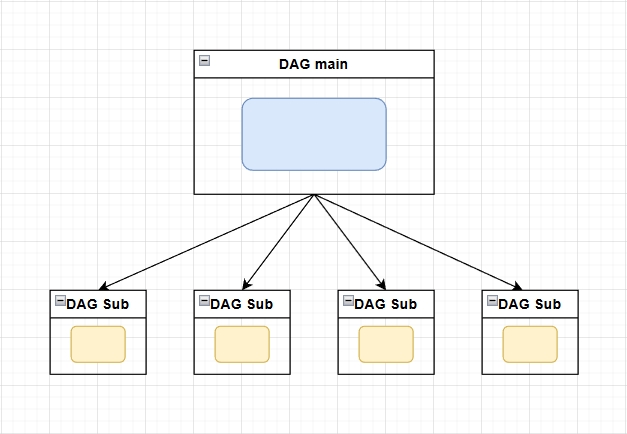
This approach solves the retry issue introduced by loops by making each shipping action atomic.
It satisfies the need for separated execution, provides observability for each subtask, and allows individual retries when failures occur.
This pattern worked well at first—until the number of DAGs started growing uncontrollably.
In addition, inspecting the execution results of a DAG main required manually searching through the records of multiple DAG sub runs.
In the shipping example above, once all item-level shipping tasks are completed, another DAG must periodically check the execution status of all related DAG sub runs under the same DAG main.
Only after all DAG sub runs are completed can the workflow proceed to the next step.
At this point, I came across a feature mentioned in the official documentation:
Dynamic Task Mapping — Airflow Documentation
https://airflow.apache.org/docs/apache-airflow/2.10.5/authoring-and-scheduling/dynamic-task-mapping.html
(The following examples are based on Airflow 2.10.5, which is the version used at my company. This feature is also available in Airflow 3.)
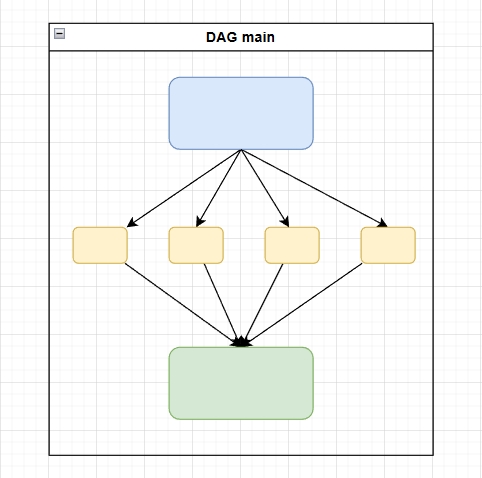
By expanding a dataset using expand, Dynamic Task Mapping allows identical tasks to be executed in parallel within the same DAG.
Because everything stays within a single DAG, downstream tasks can naturally follow once all mapped tasks are completed.
The expected workflow looks like this:
PoC (Proof of Concept)
Before starting the PoC, the goal was clearly defined:
Validate whether Dynamic Task Mapping can replace the Processor-Sender pattern, reducing the number of DAGs and improving maintainability.
The requirements were analyzed as follows:
- Observability: individual item execution results must be visible in the UI
- Atomicity: tasks must be independently retryable to avoid tight coupling
- Performance: multiple tasks should run in parallel with configurable concurrency
Below is a simple PoC implementation using Dynamic Task Mapping.
from datetime import datetime, timedelta
import random
import time

from airflow import DAG
from airflow.decorators import task
from airflow.exceptions import AirflowException
from airflow.models.xcom_arg import XComArg

default_args = {
    "owner": "airflow",
    "retry_delay": timedelta(minutes=1),
}

with DAG(
    dag_id="dynamic_task_mapping_poc",
    start_date=datetime(2025, 1, 13),
    schedule=None,
    catchup=False,
    default_args=default_args,
    tags=["poc"],
    max_active_runs=1,
    max_active_tasks=3,
) as dag:

    @task
    def fetch_items():
        """
        Simulate data preparation in the DAG
        """
        return [
            {"item_id": "A"},
            {"item_id": "B"},
            {"item_id": "C"},
            {"item_id": "D"},
            {"item_id": "E"},
            {"item_id": "F"},
            {"item_id": "G"},
            {"item_id": "H"},
            {"item_id": "I"},
            {"item_id": "J"},
            {"item_id": "K"},
            {"item_id": "L"},
        ]

    @task
    def process_single_item(item: dict) -> str:
        """
        Each item runs as an independent task instance
        """
        item_id = item["item_id"]

        # 20% chance of failure to verify manual retry behavior
        if random.random() < 0.2:
            raise AirflowException(f"Random failure for item {item_id}")

        time.sleep(random.randint(5, 10))
        print(f"Successfully processed item {item_id}")

        return f"done_{item_id}"

    @task
    def summarize(results: XComArg):
        """
        Collect results from all processed items
        """
        print("Finished items:", results)
        return results

    raw_items = fetch_items()
    processed = process_single_item.expand(item=raw_items)
    summarize(processed)
1. Triggering the DAG
Initially, SQLite was used as the metadata database for convenience.
According to the Sequential Executor documentation, when using SQLite, AIRFLOW__CORE__EXECUTOR must be set to SequentialExecutor, which can only execute one task at a time.
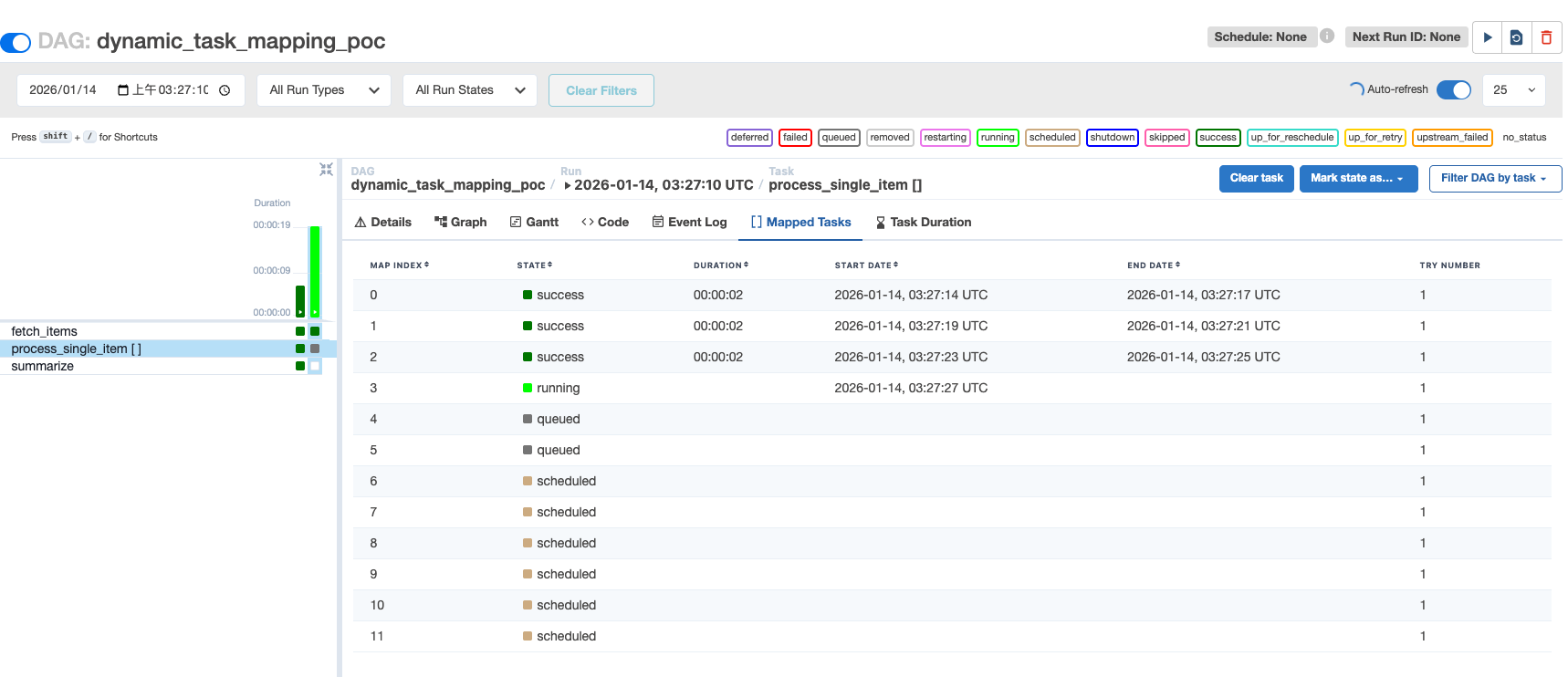
Even so, the second task already displays a tab called “Mapped Tasks.” Clicking it reveals that the input list has been expanded into independent task instances.
2. Verifying Parallel Execution
To enable parallel execution, Airflow and PostgreSQL were launched using containers.
The verification focused on:
- The parallel execution capability of Dynamic Task Mapping
- Enforcing concurrency limits via the DAG’s
max_active_tasksparameter
The following docker-compose.yaml file was used for validation.
Since this was a local PoC, credentials were left in plain text.
version: "3.9"

services:
  postgres:
    image: postgres:13
    container_name: airflow-postgres
    environment:
      POSTGRES_USER: airflow
      POSTGRES_PASSWORD: airflow
      POSTGRES_DB: airflow
    volumes:
      - postgres_data:/var/lib/postgresql/data
    healthcheck:
      test: ["CMD-SHELL", "pg_isready -U airflow"]
      interval: 5s
      timeout: 5s
      retries: 5

  airflow:
    image: apache/airflow:2.10.5-python3.11
    container_name: airflow
    depends_on:
      postgres:
        condition: service_healthy
    environment:
      AIRFLOW__CORE__EXECUTOR: LocalExecutor
      AIRFLOW__DATABASE__SQL_ALCHEMY_CONN: postgresql+psycopg2://airflow:airflow@postgres:5432/airflow
      AIRFLOW__CORE__PARALLELISM: 32
      AIRFLOW__CORE__MAX_ACTIVE_TASKS_PER_DAG: 16
      AIRFLOW__CORE__LOAD_EXAMPLES: "false"
      AIRFLOW__WEBSERVER__EXPOSE_CONFIG: "true"
    volumes:
      - ./dags:/opt/airflow/dags
      - ./logs:/opt/airflow/logs
    ports:
      - "8080:8080"
    command: >
      bash -c "
      airflow db migrate &&
      airflow users create \\
        --username admin \\
        --password admin \\
        --firstname admin \\
        --lastname admin \\
        --role Admin \\
        --email [email protected] &&
      airflow scheduler & airflow webserver
      "
volumes:
  postgres_data:
Verification Steps
- Start containers: docker compose up
- Verify Airflow configuration:
- Enter the container: docker exec -it airflow bash
- Run: airflow config get-value core executor
- Ensure the result is LocalExecutor
Results
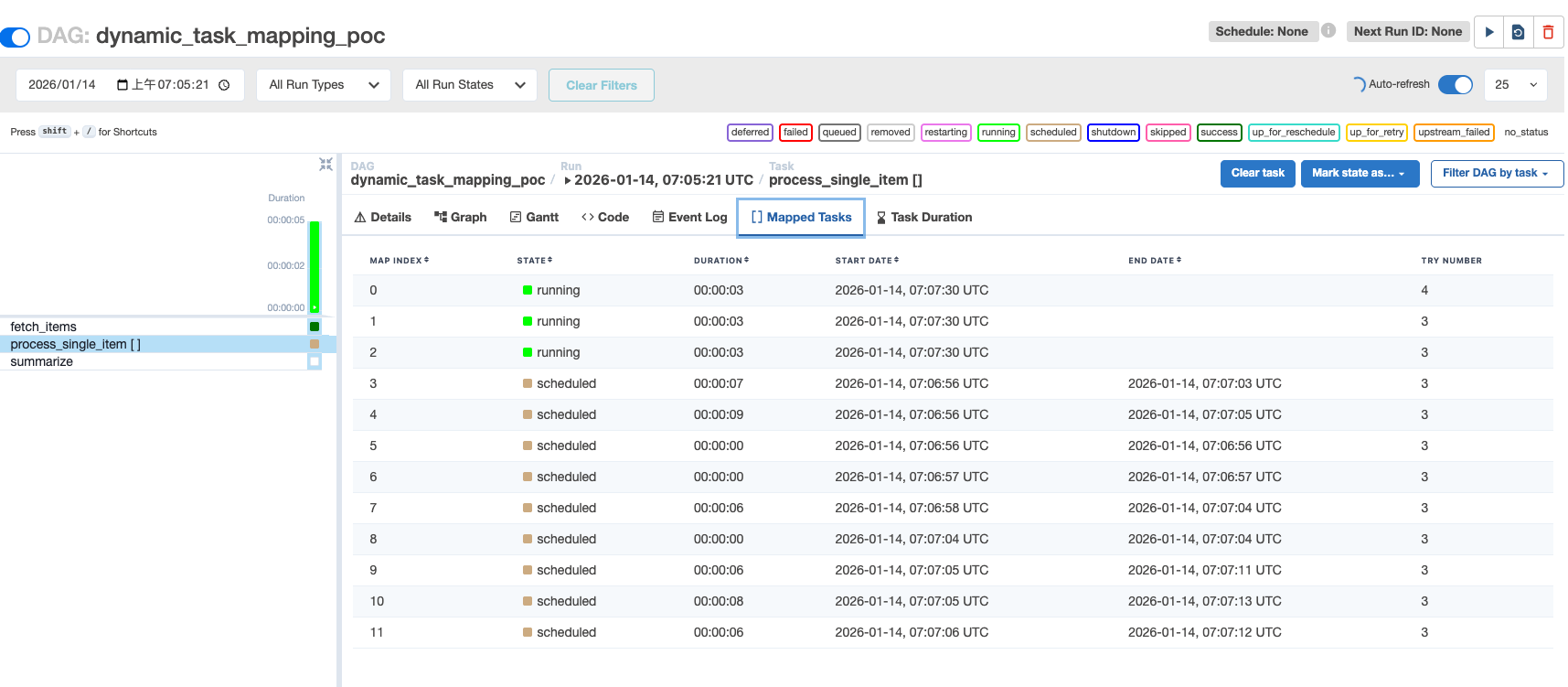
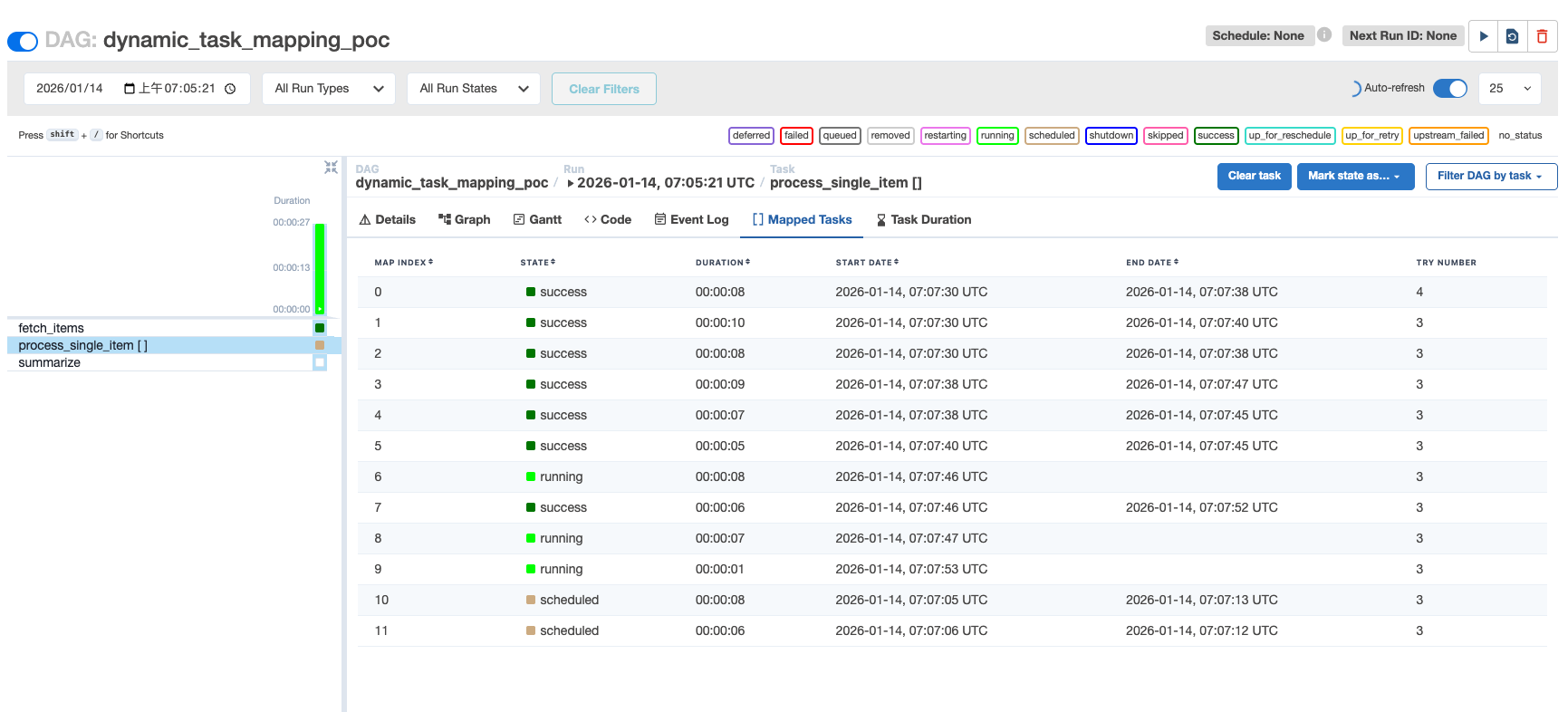
With max_active_tasks=3, exactly three tasks were running concurrently.
3. Retry Mechanism
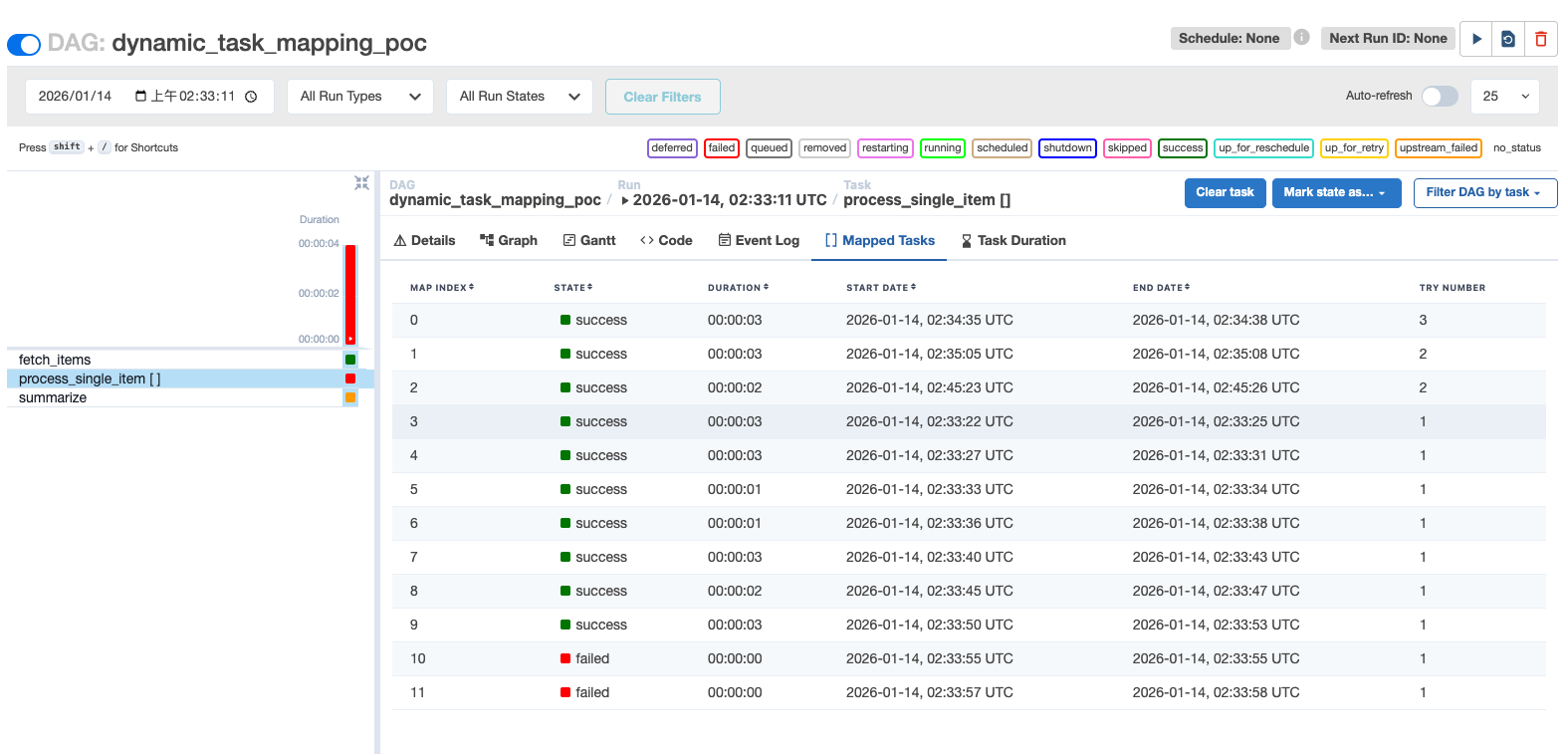
Based on the PoC code, each DAG run has a 20% chance of task failure.
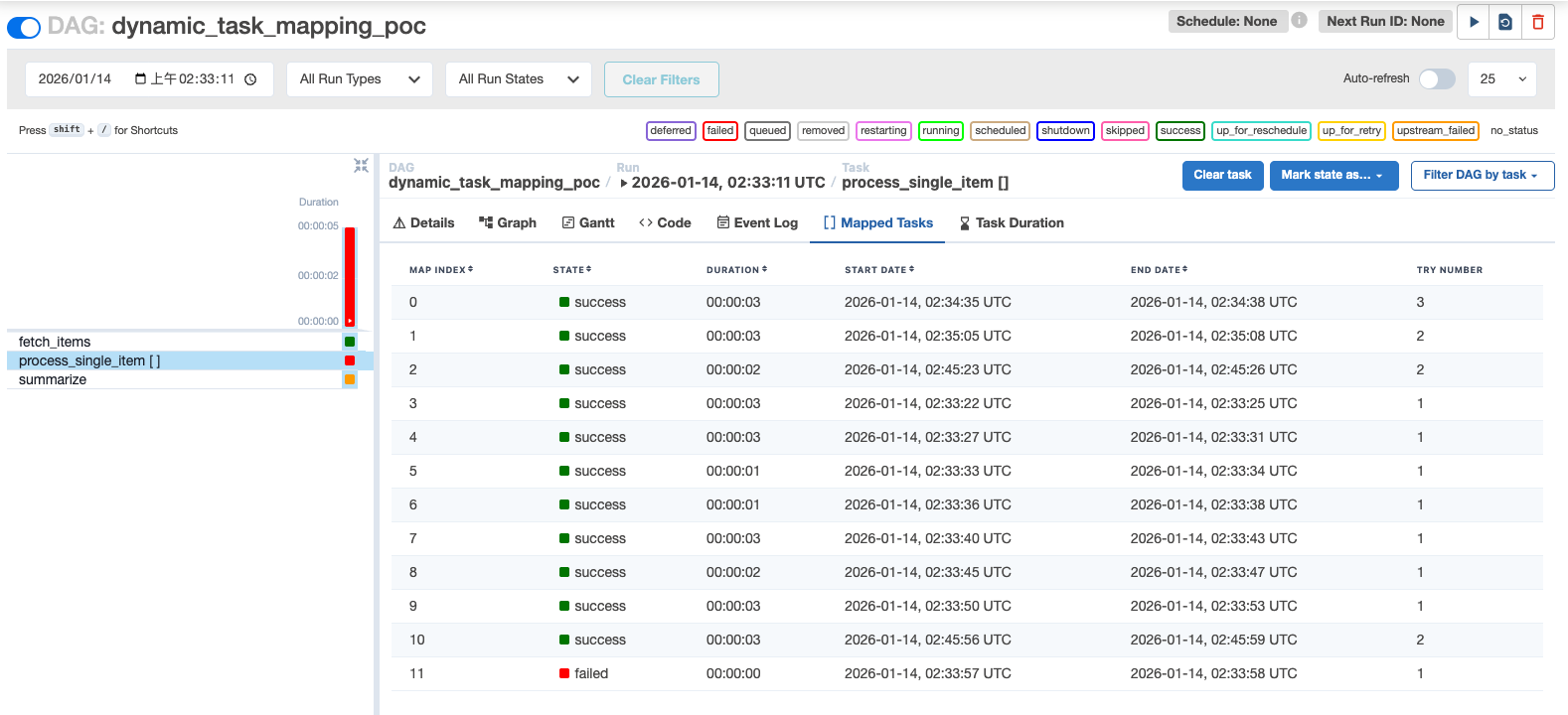
When a mapped task fails, the downstream task summarize is blocked with the state upstream_failed.
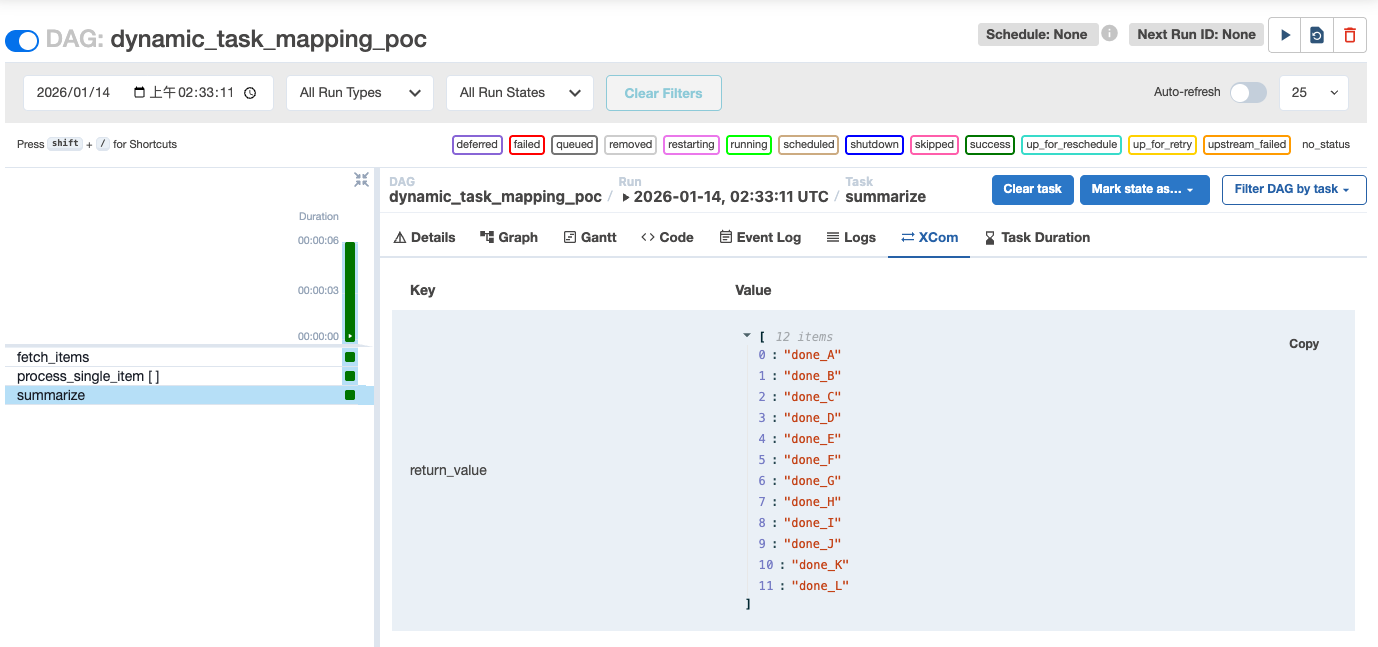
After clicking the failed task (Map Index: 10) and triggering a retry, the task transitions to success
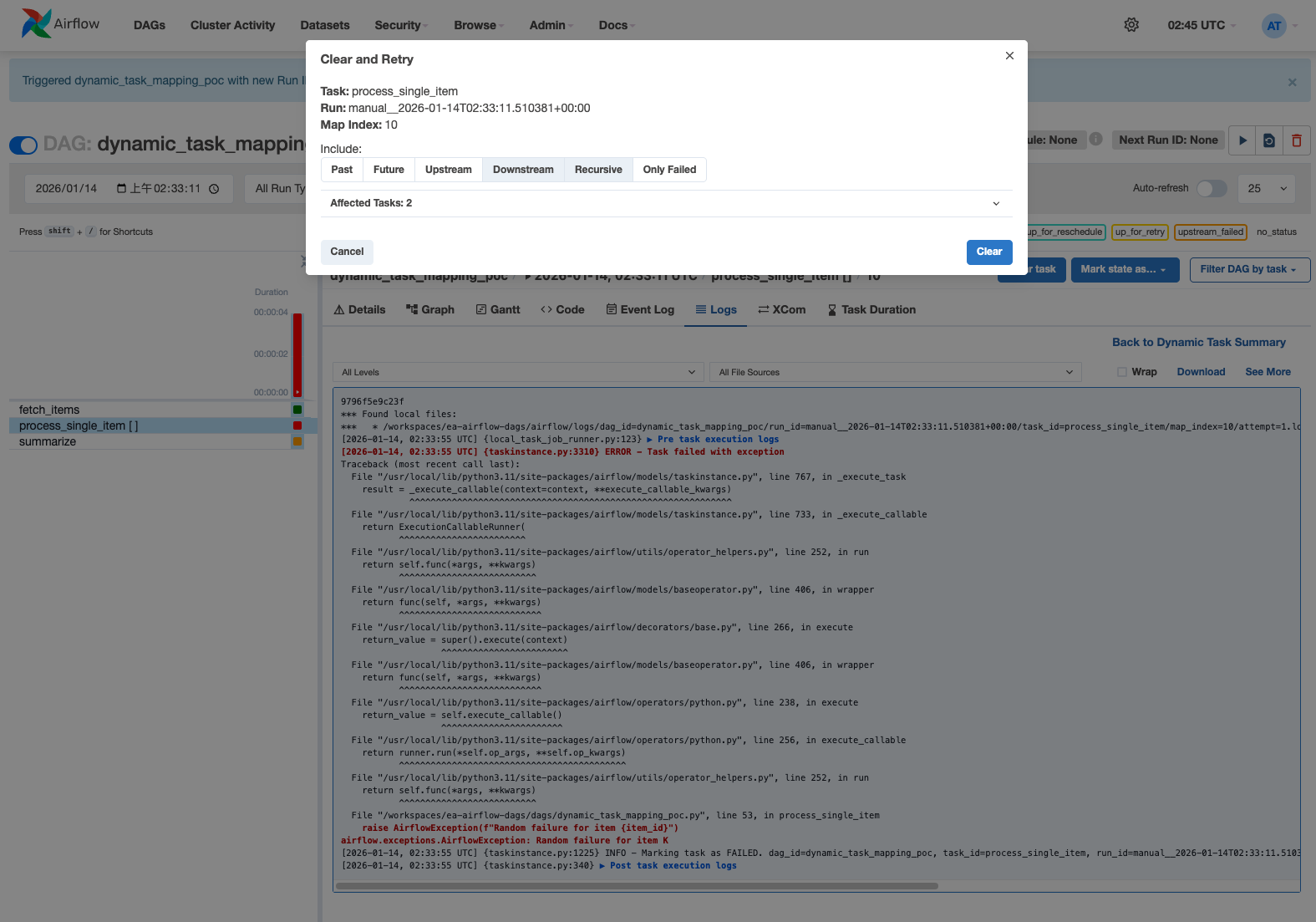
Once all failed tasks are cleared, the downstream task summarize is automatically executed without manual intervention.
Comparison
| Processor-Sender | Dynamic Task Mapping | |
|---|---|---|
| Parallelism | Supported | Supported (except with SQLite) |
| Retry | Manual clear or external trigger | Manual clear supported |
| Downstream | Non-blocking unless wait_for_completion=true |
Blocked on any upstream failure |
| Use cases | Manual parameterized execution | Data-driven parallel execution |
Conclusion
If subtasks are lightweight, indivisible, and should be retried as a whole, a simple for-loop is sufficient.
When subtasks require manual parameter input or conditional execution, the two-DAG Processor-Sender pattern is more appropriate.
Dynamic Task Mapping is best suited when:
- Subtasks under a main task have no dependencies on each other
- Each task can independently retry, succeed or fail, and maintain its own logs
This approach enables manual retries on failed subtasks while keeping them decoupled from one another.