A DAG as a Variable Desk
Designated parameter changes at the desk. All other variables, not our department.
The requesting team wants to tweak a parameter whenever they need to, without going through an engineer every time.
Giving them a database table to edit is a maintenance burden, and Airflow Variables can’t be opened up one at a time.
I don’t want to grant overly broad permissions, and I don’t want to be on call to change a value either. So what now?
The Existing Problem
There’s a DAG running on a schedule, and its decision logic depends on a parameter owned by the requesting team.
Most of the time the value stays the same, but in special cases it needs to change on short notice, and it has to “take effect on the very next run”.
Option 1: Trigger the DAG Manually with Parameters
This DAG only processes 500 records per run, and the total can reach 6000, so it takes several consecutive scheduled runs to get through everything.
The parameter has to stay in effect across all of those runs, so passing it in with a manual trigger every time just isn’t practical.
What about pausing the DAG and triggering it manually instead?
A run triggered manually while the DAG is paused only gets queued; it won’t start until the DAG is unpaused.
And the moment it’s unpaused, if a scheduled time has already been missed, the scheduler immediately creates the missed scheduled run:
catchup=False: creates a run for the most recent intervalcatchup=True: backfills every missed interval
Either way, those are scheduled runs using the default parameters, not the value we entered manually.
Before the manual run even starts, a run with the default value has already processed a batch of data.
The result is some data getting processed with the wrong parameter, so this option is out.
Option 2: Create a Table to Store the Parameter
The requesting team is used to querying and wrangling data with SQL, so their proposal was a dedicated table just for this parameter.
Whenever it needs to change, they’d run an UPDATE themselves, with no code change and no engineer involved.
But that’s a whole table for a single value, and the permissions, schema, and database maintenance all land on the engineers.
On top of that, there’s a list of questions to answer first:
- Is this table dedicated to this one parameter? Then when other projects or requirements need to store parameters too, does each of them get its own table?
- If others can store things there too, it quickly turns into a junk drawer where nobody can tell whose row is whose or whether it’s still in use.
- A raw
UPDATEhas no validation at all; a typo won’t be noticed until the scheduled run fails. - There’s no record of who changed what, or when.
Option 3: Airflow Variable
Airflow already has Variables for exactly this kind of setting.
The DAG reads it on each run, so a change takes effect on the next one.
This looks like the best fit.
The problem is that Airflow controls permissions per resource, so granting edit access to Variables means all of them.
The API tokens and account passwords used by other pipelines live in Variables too.
I only wanted them to change one parameter, and ended up handing over every token and password.
Under the principle of least privilege(PoLP), this permission can’t go to the requesting team.
But I also don’t want an engineer on standby every time a change is needed.
The Solution
A DAG as the Dedicated Window for a Variable
Since Variable permissions can’t be scoped any finer, hardcode “which key can be changed” into a DAG instead.
- Write a separate DAG that hardcodes the Variable key, so the requesting team can only enter a new value.
- Use
rolepermissions so only the requesting team can see and trigger this DAG. - The original scheduled DAG doesn’t change at all; it keeps reading the Variable and picks up the new value on its next run.
- Every change is a manual DAG run, so who changed it to what, and when, is all on record.
It essentially wraps “editing a Variable” into a service desk with a single input field.
The requesting team can fill in the value, but can’t choose which variable to change.
Proof of Concept
from __future__ import annotations

import logging
from datetime import datetime, timedelta

from airflow.sdk import DAG, Param, Variable, task
from airflow.sdk.definitions.param import ParamsDict
from airflow.sdk.exceptions import AirflowException

logger = logging.getLogger(__name__)

VARIABLE_KEY = "my_variable"

default_args = {
    "owner": "Developer",
    "depends_on_past": False,
    "start_date": datetime(2026, 6, 14),
    "retry_delay": timedelta(minutes=1),
}


with DAG(
    "variable_setter",
    default_args=default_args,
    schedule=None,
    dag_display_name="Variable Setter",
    max_active_runs=1,
    catchup=False,
    params=ParamsDict(
        {
            "variable_value": Param(
                type="string",
                title="Variable Value",
                description="The Variable value to set",
            ),
        }
    ),
    doc_md="""\
        ### Set Variable Value
        Enter a Variable value to write to the designated Variable key.
    """,
) as dag:

    @task
    def update_variable(**kwargs):
        """Read the input parameter, validate it, then update the designated Variable"""

        # Read the input parameter and validate it
        variable_value = (kwargs["params"].get("variable_value") or "").strip()
        if not variable_value:
            raise AirflowException("variable_value must not be empty")

        # Get the current value
        old_value = Variable.get(VARIABLE_KEY, default=None)

        # Update the Variable value
        Variable.set(VARIABLE_KEY, variable_value, description="You can add a note too")
        logger.info(
            "Updated Variable %s: %s -> %s",
            VARIABLE_KEY,
            old_value,
            variable_value,
        )

        return variable_value

    # Validate the parameter, then update the Variable
    update_variable()
A few key points:
paramswithParamdefines the input fields, and the trigger form is generated automatically.- The value is
strip()ped and checked for emptiness before writing, so the parameter doesn’t get wiped by accident. - The old value is read before writing, and the log records
old value -> new valuefor easier tracing. max_active_runs=1prevents two people from triggering at the same time and overwriting each other.Variable.set()can also take adescription, so its purpose is visible right in the Variable list.
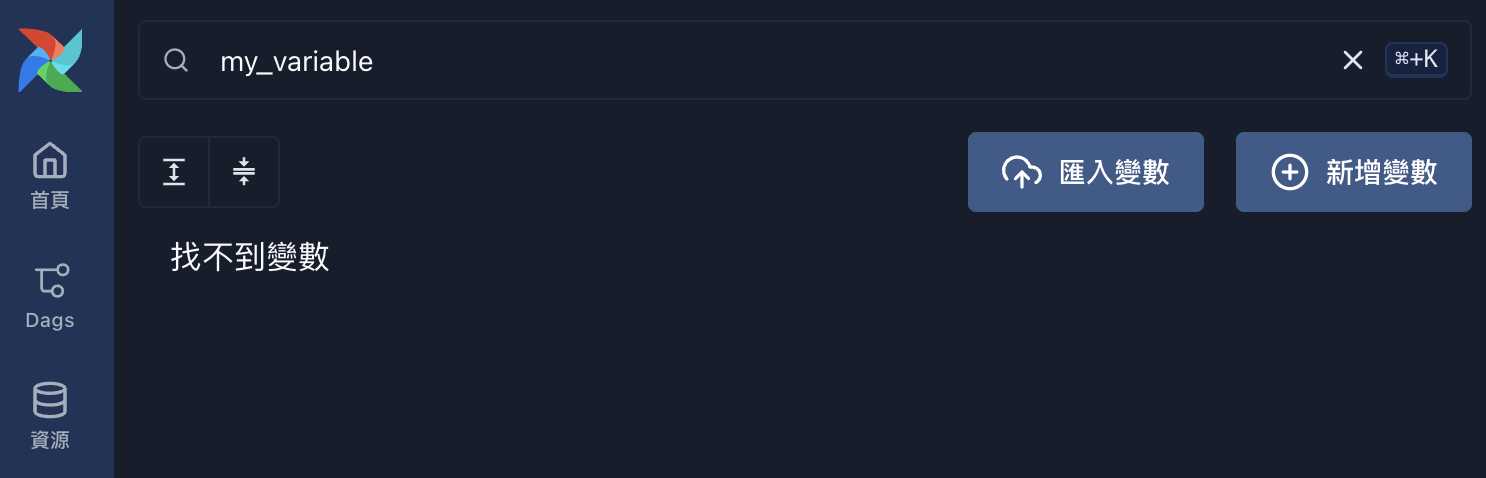
1. Initial State
At first, my_variable doesn’t exist yet.
2. Trigger the DAG to Write a Value
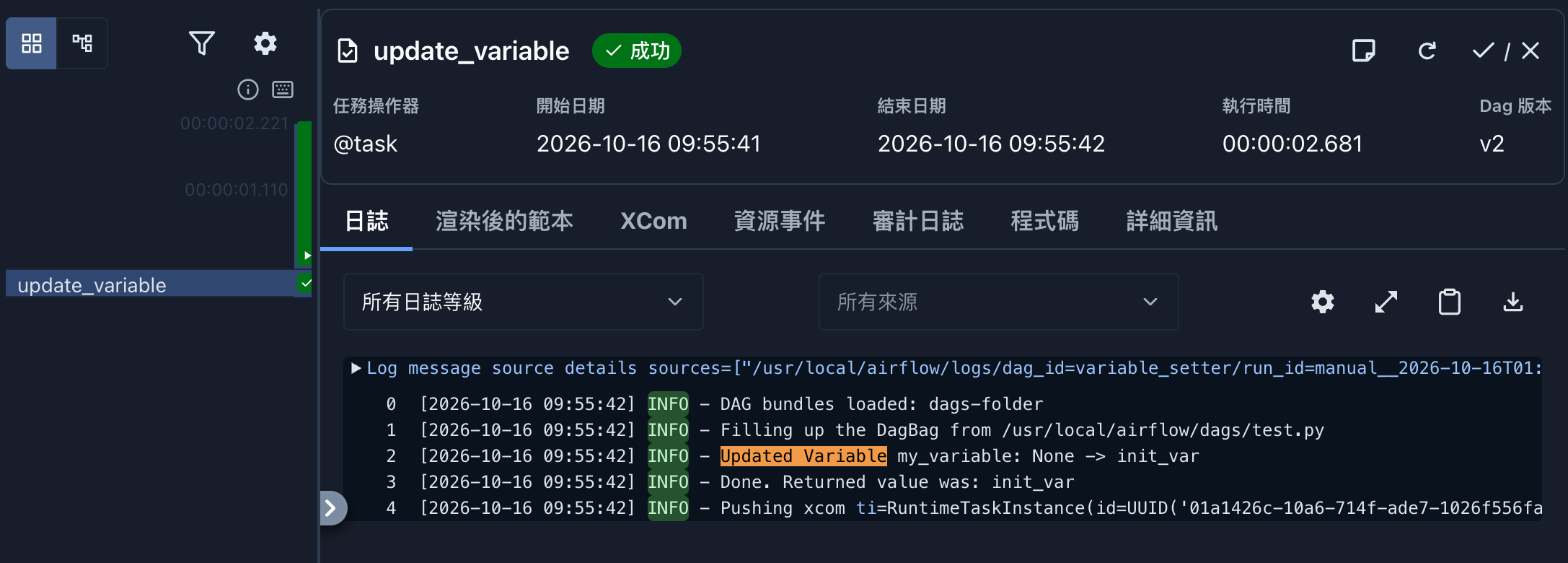
Trigger the DAG with init_var, and the log shows my_variable: None -> init_var.
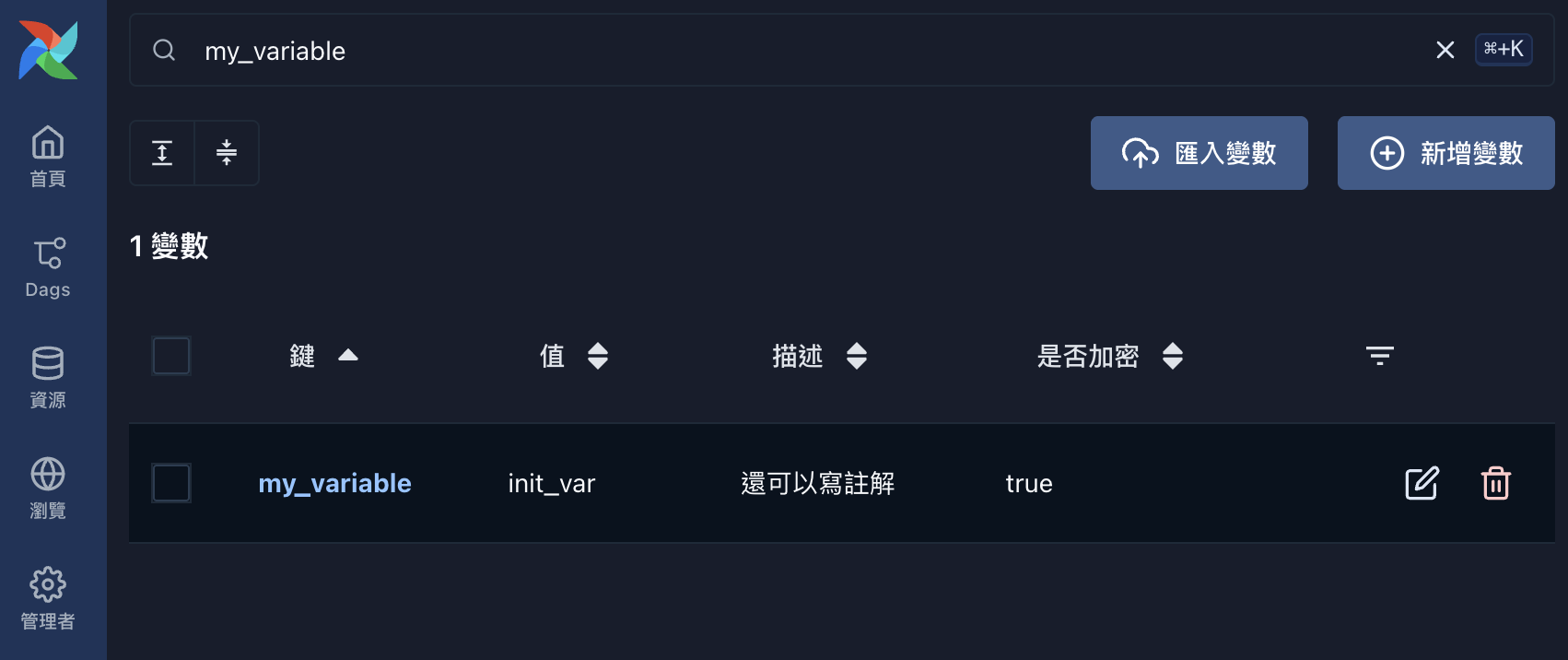
Back in the Variable list, both the value and the description have been written.
3. Trigger Again to Update the Value
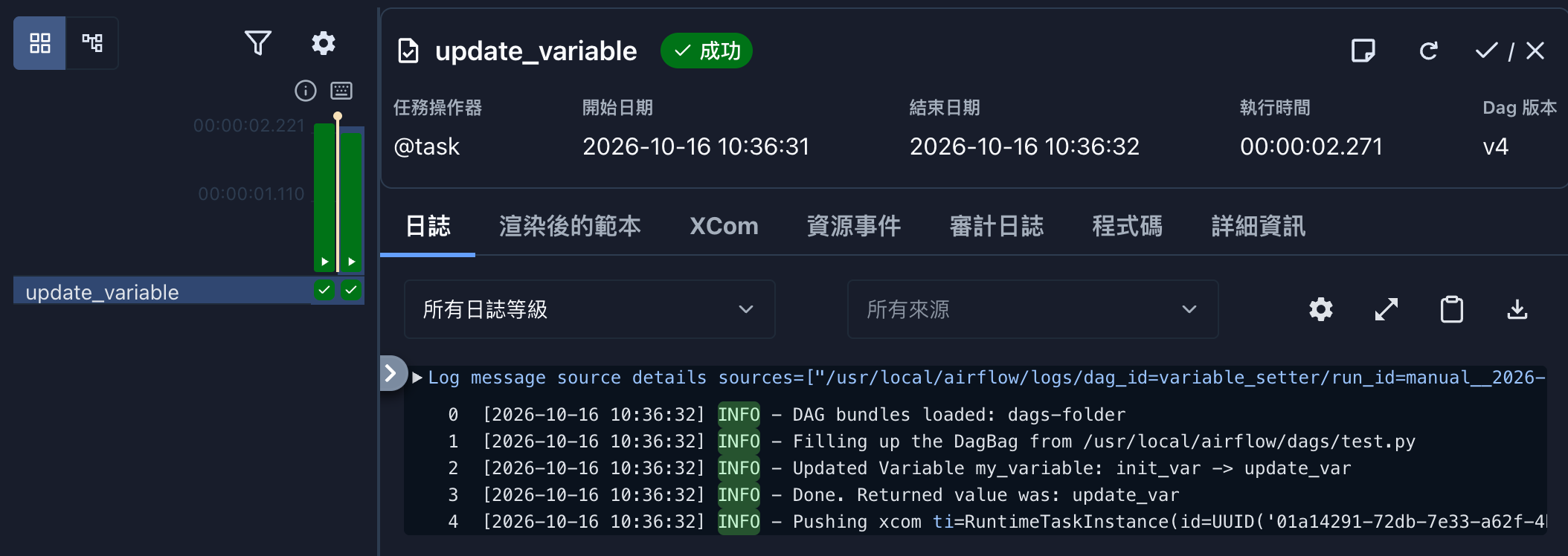
This time, enter update_var, and the log records init_var -> update_var.
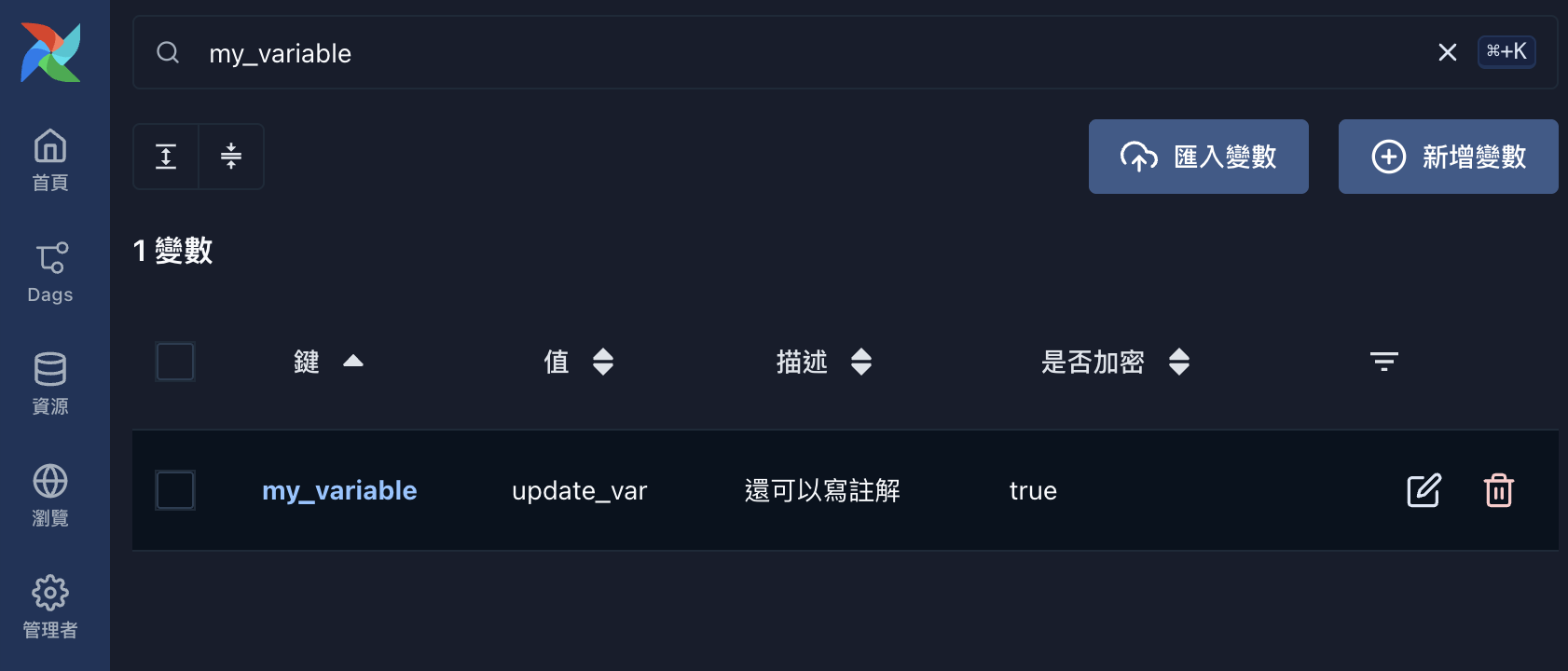
Checking the actual Variable value confirms it has been updated.
Things to Keep in Mind
Remember to set up role permissions: grant only read/trigger access to this DAG.
Don’t grant edit access to Variables, or the whole thing is pointless.
Values with a fixed format must be validated.
Add a pattern to the Param, or check it inside the task, so a bad input doesn’t break the scheduled DAG.
On the reading side, call Variable.get() inside a task, not at the top level of the DAG file.
Otherwise every DAG parse hits the metadata DB.